Try the work you will do on the next shoot
When buying a used camera, consider what you will test on arrival as well as price and appearance. Powering it on and taking one picture does not establish that your intended lens and card can take you all the way from recording to saved files.
This fictional example follows a used body received for testing with an existing lens, compatible card, battery and the computer already available. Photograph a red cup on a desk, record a short clip at the intended settings, open both on the computer and save finished files to another location too. A new camera or high-performance computer is not a condition for starting.
If you are still choosing a body or lens, begin with choosing equipment for what you want to photograph. This continuation tests the chosen setup through actual work.
Before ordering, check the test period and contact
Read the listing for the body, accessories, disclosed damage or faults, seller and warranty scope. Check the conditions/deadline for returns, contact for an initial fault, shipping and refund method for that item and seller. Ask before buying if a condition that matters to you is missing.
I prefer Amazon as one candidate when buying new. Conditions still depend on seller and product condition. This is not a promise of a universal return period or refund. Read the current terms from the seller and order screen when purchasing.
A motorized slider I bought in a person-to-person transaction worked initially, then failed that day. The price was refunded after discussion, but return shipping and the time spent handling it were not recovered. I am not rejecting every private seller; I want to include inspection and problem-solving work in the apparent saving.
Amazon Japan's return and exchange information is a Japanese-market example. It does not establish a particular deadline or full refund here, or conditions elsewhere. Before ordering, read what applies to the item, seller, condition and reason.
The slider's specified refund method also took work. With used storage media, past writing, impacts and temperature history can be hard to know; that is another reason I choose new.
On arrival, compare the item and accessories with the listing. Keep the serial number, appearance and receipt date for your own records. Make time to test the intended combination before any applicable deadline. If planning to resell used equipment later, include fees and shipping; its resale price and eventual loss are not certain when buying.
Use the camera, controls and connections
Attach a supported lens and charged battery, then set the date/time. For example, Sony's official compatibility information lets you check a specific body/lens pair. Attachment and full functionality are separate questions.
Place the cup on the desk. Autofocus nearer and a little farther away, take photographs, then enlarge the subject in playback to inspect the intended focus. Try your usual aperture/exposure settings, buttons and dials. With a zoom, test the focal lengths you need too.
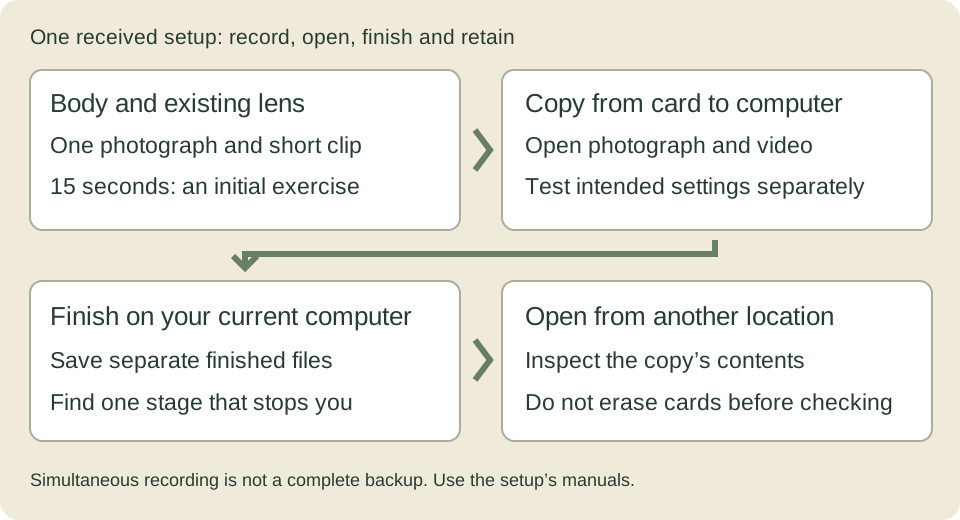
Next record video at the settings you plan to use. About 15 seconds is an initial recording/playback test. If you need long continuous takes, test the required duration separately. A short successful clip does not establish heat behavior or long battery life.
A card slot is the opening for a memory card. If the camera has two, test recording in each. For a microphone or external power, try the relevant port and actual cable. Change one condition at a time if something fails, so that a faulty port can be distinguished from an incompatible setting or cable.
Check simultaneous recording in settings and actual files
I value simultaneous card recording. Two slots do not guarantee identical recording for photographs or the video format you want. Read the supported cards, destination settings and recording mode, then open the actual files from both. Simultaneous recording is not a substitute for a complete backup and recovery process.
Find your model's supported cards and separate photo/video recording destinations in its manual. For example, the Sony α7 IV guide describes these under MENU → Shooting → Media → Rec. Media Settings. Simultaneous recording writes to both cards. Do not apply those menu names to every camera; use the model's own menu guide. This example does not identify a camera the author owns.
After testing, copy Card 1 and Card 2 into separate folders and open the photographs and clips on the computer. RAW on one card and JPEG on the other is different from storing the same original file twice. Behavior when a card fills also depends on model and settings; reread the manual before using it on a shoot.
My policy is to buy memory cards and storage drives new from sellers with a clear contact. New equipment can fail too: test it before use and keep a separate checked copy after shooting. I do not use cards as long-term storage.
Finish one photograph and one clip on your existing computer
Copy the test material from the card and open it. Adjust the photograph's brightness/color in your usual software and save a separately named JPEG. Play the whole video, trim what is needed and save in the intended format. Reopening the finished files establishes that you reached finishing on that computer, not just recording.
Then try roughly the amount you normally handle at once. One picture may open quickly while selection, playback or export of a group takes time. Instead of only “the computer is slow,” note where and approximately how long you waited. “Copying finishes but video playback stops” differs from waiting for an export.
First check free space, the software's supported formats and the card-reader/external-drive connection. If it stops only on the external drive, keep your copies and compare the same material on internal storage, changing one condition. Some video editors can make proxies: smaller working copies for editing. They also take time and storage to create, so they are not a compulsory first step for everyone.
Display brightness/color, necessary ports and the connection used for submission also affect work. If replacing the computer, ask whether it improves the stage that repeatedly stops you. If one photograph and clip can be finished now, you can begin with the computer you have.
Test charging, external power and attachments separately
Separate charged and used batteries, for example in different case compartments. Mark batteries A and B for your own use and note working time at the same settings to spot one draining unusually fast. Compare actual recording time as well as the percentage display. If there is swelling, damage, abnormal heat or smell, stop using/charging it and consult the manufacturer.
External power during shooting and charging a battery are different. For example, the α7 IV can shoot on USB power, while its guidance distinguishes that from charging the battery in that state. Read the required battery, port, power source and cable conditions, then test the actual combination. Do not calculate recording time from capacity alone or treat every USB port alike.
If several devices share one power source, check its manual for the output available at each port when used together. Voltage conversion, cables and other losses mean the stated capacity does not translate directly into the camera's recording time. Connect all the devices and cables intended for the shoot, make a short recording, and check both continuous recording and strain on the connections. For charging during a break, follow the instructions for hot batteries and charger placement; do not cover the charger and trap heat.
With a tripod or gimbal, fit both the camera plate and its receiving clamp. A quick release makes attachment/removal easier through that plate. A matching shape is not enough: lock it as instructed and, low down with a hand supporting the camera, gently check retention. Also check twisting in portrait orientation, access to the battery/screen and cable snags. Follow the product's load and fall-prevention requirements.
Keep the necessary wrench and screws with the setup. Using the same sequence—insert, lock, check retention, check screw tightness—helps avoid omissions when hurried.
For the next time you assemble the rig, keep a one-line note or photograph of the camera and lens, plate, receiving clamp and required tools. When changing the combination, check locking, looseness and interference again rather than assuming it is the same as before.
Describe one fault and test again after repair
Instead of only “video does not work,” record “with this lens, card and setting, recording stops after this many seconds with this message.” Note whether it happens every time or with a particular cable, where known. After a used purchase, report it to the seller's designated contact within the applicable period. You do not need to keep using abnormal equipment to find the cause.
Remove sand, dust and moisture as the manual instructs before storage. Follow the model's instructions for hot batteries, port/sensor cleaning and storage temperature. Dismantling the equipment is not part of this beginner check.
For repair, ask about changes to estimates, handling of settings/data, included items and an approximate return time. Check card copies and remove cards unless instructed otherwise. Record the serial number, appearance and items being sent. Follow the repair provider's and carrier's battery-shipping instructions.
After return, compare accessories and the reported fault, then check time, recording format, button settings and copyright information. Reassemble the actual lens, card and power source; take the same photograph and clip and reopen them on the computer. A “repaired” notice alone does not test your working combination.
Leave the setup ready for your next shoot
Finish when you can record the photograph and video, open and finish them on the computer, and reopen the finished files from another location. Leave one line with the equipment names and results: “this setting worked” or “this port still untested.” Do not extend that result to untested long takes or formats.
Format the card only after the needed copies are in two locations and you have actually opened them. Two cards kept in one bag do not protect against losing the whole bag. Continue to saving and retrieving files or recording a short usable clip. Before adding equipment, test whether one existing setup can reach a finished result.