You would like to try stock photography, but you are not sure where to start. Follow one simple desk scene from taking the picture to saving a finished file, describing it, and sending it for review. When you reach a step that needs more detail, follow the guide for that task.
1. Start with one scene on your desk
For this first exercise, put a plain cup and an open, blank notebook on a desk at home. Leave people and other people’s artwork out of the frame. You can move the objects and change the light yourself. The desk scene used throughout these guides is a fictional example to explain the process.
Use the camera you already have to take one horizontal photograph showing both objects. You do not need to buy a new camera or recruit models before you can begin. Later, check the actual file to see whether your equipment can produce a photograph that meets your chosen stock site’s requirements.
Today’s aim is to understand what happens between taking a picture and submitting it for review. You are not trying to predict a guaranteed bestseller. Once you have prepared one photograph, you can use the same sequence for your next scene.
I think you can start stock photography at any time. Photos and videos you took in the past may sell while you are not working if you finish them as usable assets and submit them. Look for subjects you can keep working with among the places and people you can photograph now.
2. A customer buys permission to use the photograph
Stock photography makes photos and videos available for uses such as advertising, articles, and explanatory material. A customer receives permission to use an asset within the terms of an agreement. That permission is called a license.
One customer might use your cup photograph in an article about taking a break; another might use it in a lifestyle advertisement. A typical stock license is different from transferring the copyright in the photograph itself. The agreement defines the permitted uses; it does not allow unlimited use in every product or advertisement. See Adobe Stock’s explanation of customer licenses for its terms.
Royalty-free does not mean that the image is free of charge. It describes a licensing arrangement without an additional fee for each use within the permitted scope. In ordinary stock sales, the creator earns a payment, called a royalty, when a customer licenses the asset. The amount and calculation depend on the site and agreement. You do not find each later advertisement and send the customer a separate invoice.
Taking the photograph yourself does not settle every question about what appears in it. A logo on the cup, a readable book cover, or a family member’s face may need attention. Remove things unrelated to the scene, or establish the necessary consent and permissions. Before photographing people, read how to explain a shoot while someone can still decline. Before going on location, check the destination’s photography rules.
3. Follow one photograph through the submission process
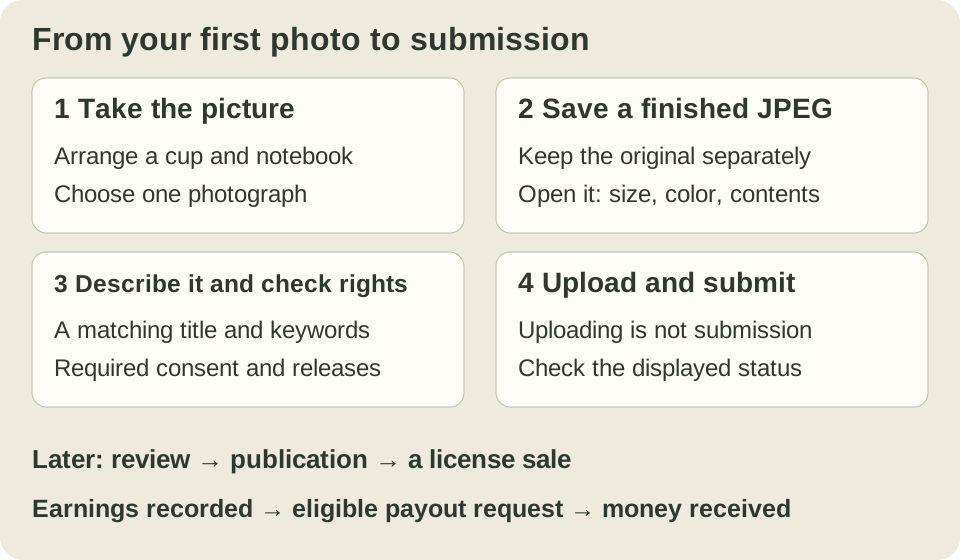
- Take the photograph. Choose the light and the position of the cup. Use the cup-and-notebook exercise to try different compositions.
- Choose and finish one picture. Put aside shots that are out of focus or blurred. Adjust brightness or color if needed; the finishing guide explains that stage. Save a submission JPEG separately from the original. JPEG is a widely used photograph file format. The JPEG export guide explains saving with sRGB.
- Prepare words that describe the photograph. Write a short title and think of keywords a customer might search for. For this example: “Cup and open notebook on a desk”; possible starting keywords are cup, notebook, desk, indoors, and blank page. Change them to fit your own picture. Read how to choose titles and keywords, then use the destination’s official instructions for entering them.
- Upload the file and submit it for review. Sign in to a contributor account at a site such as Adobe Stock and upload your finished JPEG. Uploading means sending a file from your device to the site. Add the appropriate category, title, keywords, and required releases. Follow Adobe’s photo submission instructions through to the review submission.
If you do not have a contributor account, use the stock site’s official account instructions. That account is separate from Field Notes membership. While you prepare it, you can still practise taking and finishing a photograph on your own device.
Adobe’s submission instructions distinguish uploading files from preparing their details and submitting them. Seeing a thumbnail on the screen is not the end of the process. Check the status shown after submission. If you get stuck, compare the current official instructions with the status displayed for that photograph.
4. Open the JPEG you will actually submit
A photograph can look right in your editing software but be saved at a different size or with a different color profile. Open the actual submission file from its folder. Keep the original so you can export again with different settings. For example, you might keep IMG_0101.JPG and save the finished copy as desk-cup-stock.jpg. These are example names, not a required naming system.
For ordinary Adobe Stock photo submissions, the requirements include JPEG with an sRGB color profile, 4–100 megapixels, and a maximum file size of 45 MB. MP means a million pixels; sRGB is a standard for representing color in an image. These requirements were checked on 20 October 2026. Check focus and the contents of the picture as well as the numbers. The JPEG preflight guide shows the file checks. These conditions are for ordinary photographs; video and individual Missions have their own requirements.
If you cannot choose a picture, start with one in which the cup’s outline is clear rather than trying to perfect every shot. If you can retake it, improving the window light or supporting the camera may be easier than trying to rescue a dark or blurred image in editing.
5. Read the review result as a separate step
Uploaded, submitted for review, accepted and published, and licensed by a customer are different stages. For your first picture, check how far you have actually progressed in your account. A photograph waiting for review is not yet a published asset.
If it is refused, first read the stated reason. Pay attention to important rights or account notices. Do not let an endless investigation of each refusal stop you taking the next photograph: use a fixable problem to improve the next image. The selection and submission workflow helps you keep work moving.
When you make a sale: earnings and money received are different
Ordinary royalties are calculated when customers license assets. Adobe explains its rates and agreement-based calculations in its royalty guidance. The photographer does not determine the sale date by discovering when an advertisement appeared.
First look at the earnings recorded in the site’s statement or balance. Keep that recorded amount separate from the amount eligible for a payment request and the amount you have already received. Recorded earnings do not necessarily reach your bank that day. Follow the payment request, receipt by the payment provider, and transfer to your bank separately. Moving the same money between services does not create another sale.
Also distinguish ordinary licensing royalties from temporary bonuses, project payments, refunds, and other adjustments. One large special payment is not evidence that ordinary sales will continue at the same level. Keep dated statements and project notices so you can understand the figures later. Check any confidentiality conditions before publishing a project’s records.
Adobe’s first payment request has conditions including a balance of at least US$25 and at least 45 days since the first sale. Check its current payment requirements for supported providers and tax information. These are not universal conditions for other stock sites.
The Japanese source compares US-dollar statements with money received in Japanese yen. If your records use different currencies, look at the currency, conversion, fees, and dates before comparing the amounts. Last month’s earnings may arrive this month. Start by keeping the statement in its original currency and the receipt record. Read production costs and revenue when you need a fuller record.
When the numbers do not match, open the original records
To check an amount, open the agency statement, payment-request record, payment-provider record and bank receipt in that order. The statement establishes the earnings breakdown; the bank record establishes that money arrived. A screenshot preserves what a screen showed at that moment, but does not also prove that a later payment arrived.
First note which agency, earnings period and kind of payment the record concerns, in its original currency. Separate ordinary licenses, bonuses, referral earnings, fixed project payments and adjustments using the statement's categories. An invitation, submission or acceptance notice alone is not a reason to add unrecorded earnings as a confirmed amount. Keep project notices privately with the date received, and check confidentiality terms before publishing their contents.
For example, if September earnings were received in October, keep the earnings period separate from the receipt date. Mark an amount or date you cannot establish as “unknown,” and a field you have not checked as “not checked.” This avoids filling gaps from memory or a nearby date. If you carry an investigation into the next month, keep a note that identifies the same payment so you do not count it as two sales.
Record fees, tax deductions and the conversion rate separately to the extent that the records establish them. Converting old US-dollar earnings to Japanese yen at today's rate gives an estimate for comparison, not the historical amount received. This is a day-to-day checking note. For figures used in tax filings or accounts, consult a qualified professional about the treatment that applies to your location and business.
Take your own picture to the next step
If you have not taken the picture yet, start with the cup-and-notebook exercise. Once you have chosen a photograph, work on brightness and color and export a separate JPEG.
If your JPEG is ready, open and check the saved file, then describe it and submit it for review. You can photograph your next scene while waiting for review or sales. As the process becomes familiar, set aside clear failures and finish more usable photographs with meaningful differences in scene and composition.